
Managing employees involves much more than maintaining a list of names and processing salaries each month. HR teams often handle attendance, leave, employee records, payroll calculations, deductions, reimbursements, tax documentation, and compliance-related reporting. As organizations grow, managing these activities across spreadsheets and disconnected applications can become difficult to control. HR & Payroll management software brings many of these processes into a connected digital workflow, helping businesses reduce repetitive administration and improve visibility over workforce operations. But does software genuinely simplify HR and payroll management, or does it simply move the same complexity into another system? The answer depends on functionality, implementation, data quality, and how well the technology fits the organization's actual processes.
Quick Answer: Can HR & Payroll Software Simplify Workforce Management?
Yes. HR and payroll software can simplify workforce management by connecting employee records, attendance, leave, salary calculations, deductions, payslips, and reporting in one system. Automation can reduce repetitive data entry and calculation work, while centralized records can give HR teams better visibility. However, software works best when supported by accurate employee data, clearly defined policies, trained users, and appropriate compliance processes.
Why Does Workforce Management Become Difficult as a Business Grows?
A small company may manage employees with spreadsheets and separate payroll tools without major difficulty. As headcount increases, however, the number of variables also grows.
HR teams may need to coordinate:
Employee onboarding and documentation
Attendance and working hours
Leave and holiday policies
Salary structures
Overtime and allowances
Reimbursements
Deductions
Payroll processing
Payslips
Employee self-service
HR reports
Statutory and tax-related records
The challenge is often not one complicated task but the number of interconnected tasks.
For example, an employee's attendance can affect payable days, leave balances can affect payroll, and salary changes can affect deductions and tax calculations. When information is maintained separately, HR staff may need to enter or verify the same information multiple times.
How Does HR & Payroll Management Software Simplify These Processes?
The main advantage is connected information.
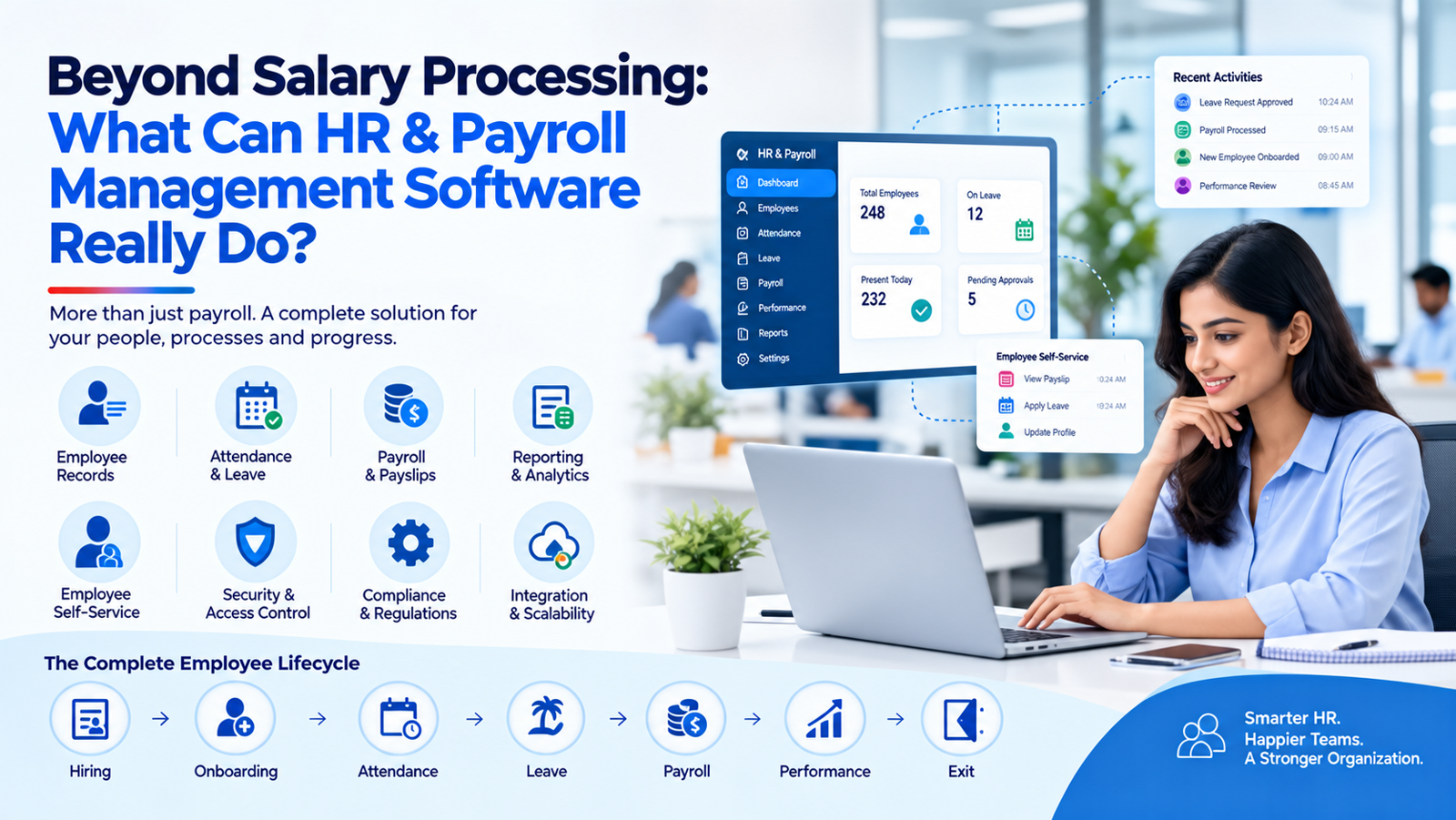
Instead of treating HR activities as independent processes, an integrated platform can create a workflow such as:
Employee record → Attendance → Leave → Payroll calculation → Deductions → Payslip → Reporting
This can reduce unnecessary duplication and make it easier to identify where information originated.
1. Centralized Employee Records
Employee details, job information, salary structures, documents, and other HR records can be maintained in a central location.
This gives authorized HR personnel a consistent source of information rather than requiring them to search through multiple spreadsheets or applications.
2. Attendance and Leave Management
Employees can record attendance and submit leave requests digitally, while managers can review and approve them according to organizational policies.
When attendance and leave information connects with payroll, HR teams have fewer manual calculations to perform.
3. Automated Payroll Calculations
Payroll software can calculate salary components according to configured rules, including earnings and applicable deductions.
The key word is configured. Payroll automation is only as reliable as the underlying salary structures, employee information, attendance data, and rules entered into the system.
4. Payslips and Employee Self-Service
Employees can potentially access payslips, leave balances, attendance information, and other permitted records without repeatedly contacting HR.
This can reduce routine administrative queries and allow HR professionals to focus on more valuable activities.
Also read: Why Modern Laboratories Are Switching to Lab Information Management Systems
What Should You Look for in the Best HR & Payroll Management Software?
There is no universally best HR & Payroll Management Software for every organization. A suitable choice depends on workforce size, business structure, payroll complexity, locations, existing applications, budget, and compliance requirements.
Before selecting a platform, evaluate:
Employee management: Can it maintain complete and organized employee records?
Attendance and leave: Can policies be configured according to your organization?
Payroll flexibility: Can salary structures and relevant deductions be handled accurately?
Reporting: Can HR managers generate useful workforce and payroll reports?
Access control: Can sensitive employee information be restricted according to user roles?
Integration: Can the platform connect with accounting, attendance, finance, or other business systems?
Scalability: Can it support additional employees, departments, locations, or business entities?
A practical evaluation should involve actual HR scenarios rather than relying solely on a feature checklist.
For example, ask the vendor to demonstrate how the system handles a new employee, a salary revision, unpaid leave, overtime, reimbursement, payroll processing, and a correction to an employee record.
Can Software Actually Reduce HR Errors?
It can reduce certain types of errors, particularly those caused by repetitive manual data entry and calculations. However, automation does not eliminate the need for human oversight.
For example, software may correctly calculate payroll according to a configured formula, but an incorrect salary structure or outdated employee information can still produce an incorrect result.
What Are the Best Practices for Implementing HR and Payroll Software?
Successful implementation depends as much on preparation as on the software itself.
Clean employee data first. Remove duplicate or outdated records before migration.
Document payroll rules. Clearly define salary components, attendance rules, leave policies, deductions, and approval processes.
Set user permissions. Payroll and employee information is sensitive, so access should be limited according to responsibilities.
Test before going live. Run sample payroll calculations and compare them against independently verified results.
Train HR and managers. Users should understand both the software workflow and the policies behind it.
Review regularly. Payroll rules, employee information, and applicable regulations can change, so configurations should not be treated as permanent.
Conclusion
HR technology can genuinely simplify workforce administration when it connects information rather than creating another isolated system. The greatest value comes from reducing repetitive work, improving data consistency, creating clearer approval processes, and giving HR teams timely access to reliable information. HR & Payroll management software should therefore be evaluated based on workflow fit, payroll flexibility, security, reporting, scalability, and the organization's compliance responsibilities. Businesses interested in broader digital management capabilities can also explore oeHealth to understand how integrated software can support connected organizational workflows.
FAQs
What is HR and payroll management software? — It is software that combines employee administration and payroll-related processes within a centralized digital system.
Can HR software automate payroll? — Yes, many systems can automate salary calculations, deductions, payslips, and payroll reports based on configured rules and employee data.
Does HR software manage attendance and leave? — Many platforms connect attendance, working hours, leave requests, and approvals with broader HR workflows.
Is HR and payroll software useful for small businesses? — It can be useful when administrative workload, employee numbers, or payroll complexity makes manual management inefficient.
Can payroll software guarantee compliance? — No; software can support compliance processes, but organizations remain responsible for correct configuration, data, approvals, and applicable legal requirements.
Write a comment ...